1.)Exchange Online must be FULLY functional.
This means that all internal senders are correctly set up and/or migrated. Emails which are addressed from the Internet to the domain(s) of your organisation will be sent to the M365EO MX host.
2.)The SEPPmail Secure E-Mail Gateway is commissioned and can be reached on the following ports using these protocols via the public IP address:
a.8443 HTTPS for the admin portal
b.25 SMTP for the email traffic
c.443 HTTPS for the GINA web interface
3.)In the SEPPmail Secure E-Mail Gateway under X.509 Root Certificates, the root and intermediate certificates - via which Microsoft obtains the Microsoft 365 TLS certificates - are imported and classified as trustworthy (trusted) (if applicable, see also "https://docs.microsoft.com/en-us/microsoft-365/compliance/encryption-office-365-certificate-chains?view=o365-worldwide").
4.)For the SEPPmail Secure E-Mail Gateway there is an SSL certificate of an accredited certification authority. This certificate must include the FQDN used for the [default] GINA as the applicant. This can be an individual, an SAN or a wildcard certificate.
5.)The public IP address of the SEPPmail Secure E-Mail Gateway can be reached via a corresponding public DNS entry, for example securemail.contoso.de.
6.)Administrator rights have been granted both for M365EO as well as for the SEPPmail Secure E-Mail Gateway. There is also access to the DNS provider to make the necessary entries.
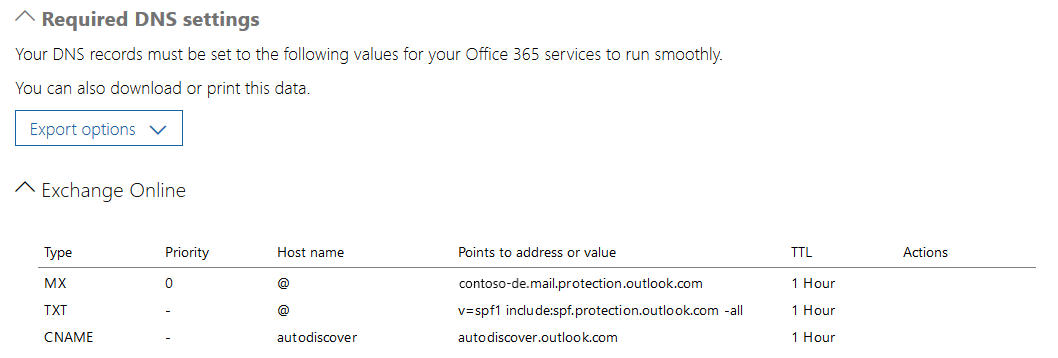
7.)The FQDN of the M365EO MX entry is available. It can be found in the Office365 Admin Center under
Domains è Select the managed domain from the list è Edit domain
where something like the following entry should be visible based on the example: