The following image shows the message flow of emails from the Internet which are processed by Exchange Online and the SEPPmail Secure E-Mail Gateway. Here, "rules" and "connectors" are used; their generation will be discussed further in the following paragraphs.
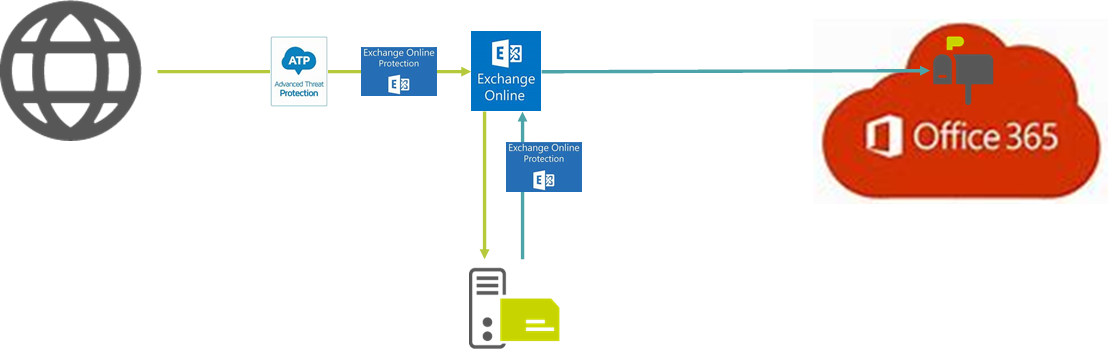
Figure 1
The MX record for the internal email domain points to Microsoft 365 FQDN, e.g. contoso-de.mail.protection.outlook.com.
Thus, all protection mechanisms of Microsoft 365 can be used.
An email originating from the Internet which is addressed to the internal organisation therefore initially passes the "Advanced Threat Protection" - abbreviated "ATP" - and the "Exchange Online Protection" - abbreviated "EOP".
Once arrived at the "Exchange Online" of the own organisation, the email is forwarded to the SEPPmail Secure E-Mail Gateway based on a corresponding ruleset; a script for a basic configuration of this ruleset is provided upon request.
The email is then processed on the SEPPmail Secure E-Mail Gateway according to its ruleset settings and returned to the "Exchange Online". Here, the email is initially checked for Malware again by means of "EOP". Thus, the contents of the originally encrypted messages are checked as well.
"Exchange Online" recognises based on the ruleset that the email has not been sent from the Internet but from the SEPPmail Secure E-Mail Gateway and therefore stores it in Microsoft 365.
In this respect, it is irrelevant where and how the SEPPmail Secure E-Mail Gateway is operated in this construct. This means that it can be embedded on the premises, in the cloud or as a service.
In combination with Microsoft 365, "Microsoft Azure" is frequently used as a hosting platform (if applicable, please also refer to MS Azure: Installation).
