For the initial configuration of the network parameters of the SEPPmail Secure E-Mail Gateway, there is an option of connecting a monitor and a keyboard and of temporarily changing the IP address to the desired value at the console. The further procedure for this method is described under Console Login.
Alternatively, the SEPPmail Secure E-Mail Gateway hardware can be directly connected to a computer via a crossover cable or via a hub.
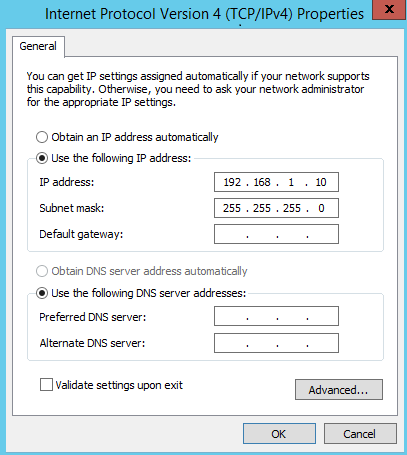
For this purpose, both devices must be in the same IP subnet. If applicable, the IP address of the computer must be changed to an IP address between 192.168.1.1/24 - 192.168.1.254/24, network mask 255.255.255.0.
|
|


Example of a corresponding network setting using the Windows interface
The further procedure is described in the section Login As Administrator.
